PDS Inbound Integration Endpoint Configuration
The PDS Inbound Integration Endpoint (IIEP) is used to receive the PDS status information for integrated products.
The PDS IIEP includes a number of preset parameters to reduce the setup required. However, the following updates are necessary for the IIEP to work with your data model.
- In the System Setup > PDS Inbound Setup Group node, open the PDS Inbound Integration Endpoint.
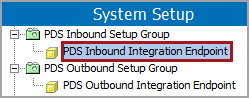
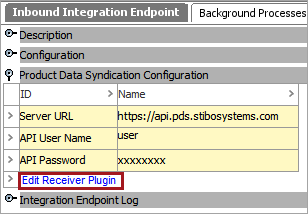
- Display the 'Inbound Integration Endpoint' tab.
- Open the 'Product Data Syndication Configuration' flipper and click the Edit Receiver Plugin link.
- On the Inbound Integration Endpoint Wizard dialog, configure the 'Product Data Syndication' receiver option and click the Next button.
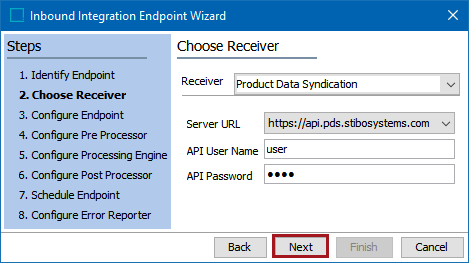
For details, see the Product Data Syndication Receiver topic in the Data Exchange documentation here.
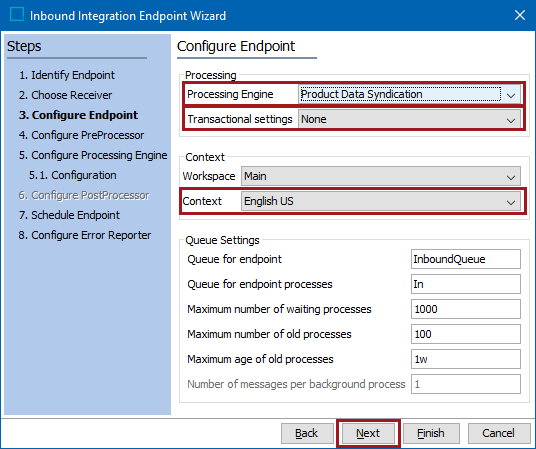
- On the Inbound Integration Endpoint Wizard, update the following parameters:
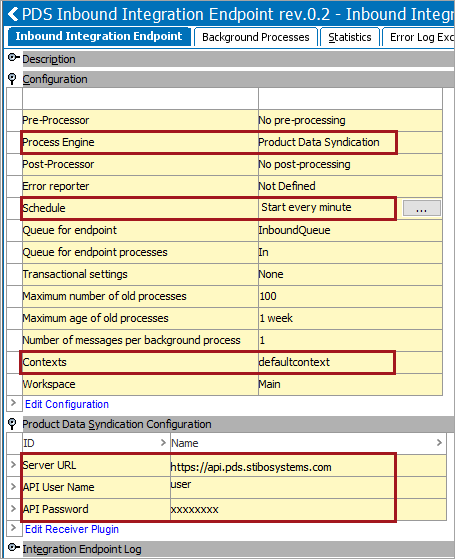
- Ensure the 'Processing Engine' parameter is set to Product Data Syndication and 'Transactional settings' is set to None.
- Set 'Context' parameter as required for your inbound data. The Workspace must remain set to 'Main' since new data can only be added to this workspace. For more information, see the IIEP - Configure Endpoint topic in the Data Exchange documentation here.
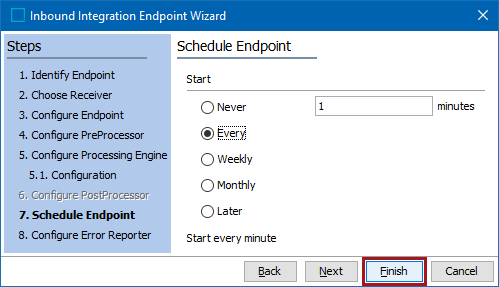
- Click the Next button repeatedly until the Schedule Endpoint step displays.
Important: Consider the time zone of the application server compared to that of the workbench (the client) where the schedule is created or viewed. When scheduling a job, the local time zone is displayed in the workbench, but the time zone of the server is used to run the background process. Although displayed, the time zone of the client is not included in the instruction to the server to run the job. This can cause confusion about when the job will run since the scheduled time is not automatically converted to accommodate potential differences in time zones.
- On the Schedule Endpoint step, set the desired schedule and click the Finish button.
Updates made in the previous steps are displayed in the 'Configuration' and 'Product Data Syndication Configuration' flippers.
- Enable the endpoint as described in the Running an Inbound Integration Endpoint topic of the Data Exchange documentation here.
After successful setup, and invocation, PDS product status information can be seen on the Data Containers tab of the product editor.