Running a Data Export
The Save Export Configuration dialog appears when you click the Finish button in the Export Manager in workbench. A saved configuration provides a way to keep all the parameter selections set while using the export wizard. Saving a configuration allows you to perform the same export again, without having to go through each step of the wizard. A saved configuration is required when scheduling exports in workbench and also when executing an export in Web UI. Whether you save your configuration or not, this dialog also allows you to start the export process.
Run an Export Configuration
Follow these steps to save and/or run an export configuration.
- Set the Save Options checkbox:
- Checked (default) is required to save changes to an existing or new configuration
- Uncheck to run or close this configuration without saving it.
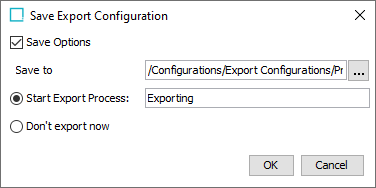
- If the Save Options checkbox is checked, click the ellipsis button (
 ) on the Save to parameter to display the Save to dialog.
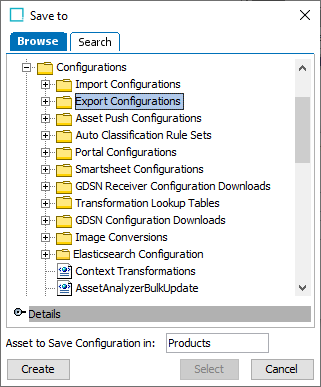
- On the Save to dialog, choose the option for your situation.
- To save a new configuration: use the Browse or Search option to select the folder for the new configuration. Type the name of the new configuration in the Asset to Save Configuration in parameter, and click the Create button that is now enabled.
- To update an existing configuration: use the Browse tab or the Search tab to select the configuration folder (to hold a newly created configuration) or a file (to overwrite an existing configuration) and click the Select button which becomes enabled.
- To close this dialog without changes: click Cancel.
- Back on the Save Export Configuration dialog, choose a radio button:
- Select Start Export Process and add a name in the field to make it easier to locate the specific process later.
- Select Don't export now to only save changes to the configuration.
- Click OK to complete the wizard. If you started an export, the Starting Process dialog appears. For more information, see the Monitoring a Data Export topic here.