ETIM Format
Electro-Technical Information Model (ETIM) is a classification structure used to standardize the electronic exchange of product data for electrical and electronic products and to enable the electronic trading of these products. The standard is designed to meet the requirements of the electrical industry and allows for a uniform, technical description of electrical goods and their assignment to a class of products. In order to support customers who need to work with data using the ETIM standard, the inbound data exchange functionality includes ETIM formats to allow for easy processing and setup of ETIM classifications and their related data elements. For more information on ETIM, search the web.
ETIM is an add-on component. Contact your Stibo Systems representative to activate ‘etim-importer’ on your STEP system.
Format Availability
ETIM format is available for selection in:
- IIEP - see Creating an Inbound Integration Endpoint here
- Import Manager - see Creating a Data Import here
Mapping
This format does not require a data map.
ETIM Configuration
Although the import tool does most of the configuration for ETIM classifications, some tasks must be performed manually.
- Use Import Manager or IIEP and select the appropriate ETIM file version (as defined below) to perform the initial ETIM import. For more information, see Creating a Data Import (here) or see Creating an Inbound Integration Endpoint (here).
- Manually create the classification link from product to ETIM classification as defined in the Create Product to ETIM Classification Link documentation here.
- Either set the object type validity upon import, or manually make the ETIM attributes valid for the product object types as defined in the Set Validity on ETIM Attributes for Products documentation here.
ETIM Versions
ETIM 5 and ETIM IXF classifications can be imported into STEP. The ETIM 5 import tool cannot delete ETIM data or mark ETIM data as obsolete. However, ETIM IXF formats will not import data marked as deleted into the system.
Multiple versions can exist in STEP simultaneously using multiple individual hierarchy structures.
- ETIM 5 uses CSV and each file contains a single language. For more information about the ETIM 5 formats, see ETIM and ETIM v2Format here.
- ETIM 6, ETIM 7, and ETIM 8 use the ETIM IXF format. ETIM IXF is the ETIM XML standard and includes multiple languages (English, German, Dutch, and a number of other European languages). For more information about the ETIM IXF format, see ETIM IXF Format here.
Important: To avoid a corrupt import, do not manipulate the ETIM files prior to import. Filtering of classifications should be handled by the import tools.
ETIM Classification
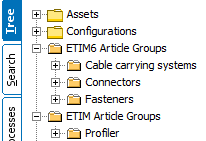
ETIM classifications are imported into STEP as an alternate classification, below the ETIM Article Groups node in the Tree.
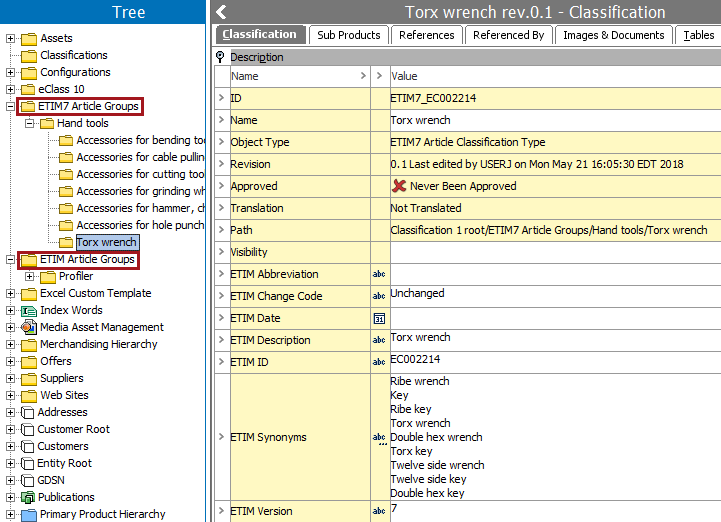
Each imported ETIM article group classification will include the following metadata attributes on the Classification tab within the Description flipper (as shown in the image below).
|
Attribute Name |
Description |
|---|---|
|
ID |
ETIM 5: Value displays ETIM preceding the ETIM ID. ETIM IXF: Value displays ETIM*_ preceding the ETIM ID; where * indicates the ETIM version number. |
|
Name |
The ETIM Description of the article group. |
|
ETIM Abbreviation |
ETIM IXF only: Abbreviation from ETIM. |
|
ETIM Change Code |
ETIM IXF only: Change Code values from the ETIM file. |
|
ETIM Date |
The date of the last change to the classification in ETIM. |
|
ETIM Description |
Description from ETIM, matches Name attribute. |
|
ETIM ID |
ID from ETIM, matches ID attribute. |
|
ETIM Synonyms |
Multivalued and contains 0 or more ETIM synonyms for the article classification. |
|
ETIM Version |
The Article Classification version from the ETIM system. |
This image shows the metadata attributes for an ETIM version 7 article group. In this system, a second article group also exists for ETIM version 5, and is named 'ETIM Article Groups.'
Attributes are linked to the relevant ETIM classification and inherited only in that classification. For example, when an item is classified in ETIM classification A and is then reclassified to ETIM classification B, the attributes from ETIM classification A become orphaned, although the values remain on the item. At the same time, the item will inherit the valid ETIM attributes from classification B.
ETIM Feature Types
ETIM operates with 'features' that roughly translate to attributes and LOVs. An ETIM feature can be of one of the following types.
|
Type |
Type Description |
Result |
|---|---|---|
|
Logic |
The logical data type holds two values: true / false or yes / no. |
An LOV with the ID 'ETIM Logical' is created in STEP. It contains the values true and false. Features are imported as attributes using the LOV. |
|
Alphanumeric |
The alphanumeric data type contains a set of predefined values. |
An LOV contains the predefined set of values. Each value is provided with a value ID. Features are imported as attributes using the LOV. |
|
Numeric |
The numeric data type is a number that allows a unit. |
Features are imported as Number validation type. |
|
Range |
The numeric range that allows a valid unit. |
Features are imported as Number Range validation type. |
Valid Values are Determined by ETIM Version
In ETIM, the set of valid values for a feature depends on the classification of the linked article and the ETIM version. In STEP, this is achieved by creating a new attribute for each classification the feature is linked into. Each of the attributes (for the same ETIM feature) use the same LOV but with an individual filter of the valid values.
Note: The core STEP solution does not offer any tools to validate that the user does not use an invalid unit when adding a value for an ETIM Classification.
ETIM 5
Typically, only one of the following ETIM 5 formats will be available in your import tools format list:
- ETIM - this import converter creates a new attribute for each classification the feature is linked into. Each of the attributes (for the same ETIM feature) uses the same LOV but with an individual LOV filter of the valid values.
- ETIM v2 - this import converter avoids having multiple attributes for the same feature by moving the LOV filter specifying the valid values from the attribute to the attribute link. This should make it far easier to import, export, and maintain the attributes.
For more information about the ETIM 5 formats, see ETIM and ETIM v2 Format here.
ETIM IXF
- ETIM IXF, versions 6 and 7- this import converter creates a new attribute for each classification the feature is linked into. Each of the attributes (for the same ETIM feature) uses the same LOV but with an individual LOV filter of the valid values.
For more information about the ETIM IXF format, see ETIM IXF Format here.
Valid Units are Determined by Classification to Attribute Link
An ETIM feature does not have a valid unit in ETIM 5 or ETIM IXF. However, when it is linked into an article classification, one (and only one) valid unit can be specified. This is different from STEP where an attribute has the same valid units no matter where the attribute is used.
Note: STEP does not include functionality to ensure only valid units are used when adding a value for an ETIM classification.
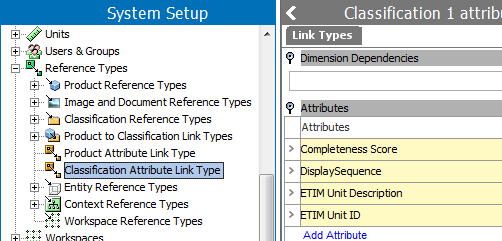
On the Classification to Attribute Link, the ETIM Unit ID and Description are stored as metadata to indicate that when used in this particular classification, only the unit specified is valid. Additional metadata includes 'ETIM Sort Number', 'ETIM Unit Description', and 'ETIM Unit ID.' The 'ETIM Sort Number' specifies the order in which ETIM determines the attribute is most relevant. If System Settings > 'Default Attribute to use as Display Sequence Attribute' is specified, the sort number will be put as metadata in this attribute, instead of using the 'ETIM Sort Number.' Notice however, that STEP does not support display sequence settings on classifications.
Note: It is possible to load various localizations of the ETIM classification system. For example, you can load an English version into the English context and a German version into the German context. While the IDs are the same across the various localizations, the descriptions of article groups, classifications, attributes, units, and lists of values are localized.
Handling Import Errors
Depending on the locale configuration and the format of the import files, the import tool may report one of the following errors. Although the report can be long, the error is likely caused by the format of two attributes:
- ETIM Version - In the ETIM configuration file the values of this attribute contain 4 characters (5,00) while STEP only expects 3 characters.
- ETIM Date - The date format in the ETIM configuration file is dd.mm.yyyy hh:mm:ss while the STEP attribute is defined as 'ISO Date and Time' (yyyy-mm-dd hh:mm:ss).
These errors can be resolved by manually importing the problem attributes as defined in the Manually Import ETIM Attribute Values documentation here.