Maintaining a Global Business Rule
The settings for business rules are specified in the Business Rule editor. The following describes how to work with global business rules. For information about local business rules, see the Business Rules in Workflows topic here.
In System Setup, expand the business rules node, then select the relevant business rule. This opens the business rule editor in a read-only mode.
Note: Business rules viewed in the approved workspace are read-only. Business rules can only be edited from the main workspace.
For information on creating a business rule or library, see the Creating a Business Rule or Library topic here.
For information on deleting a business rule or library, see the Deleting a Business Rule or Library topic here.
For an overview of the decision points involved in running a business rule, see the chart in the Running a Business Rule topic here.
Business Rule Tab
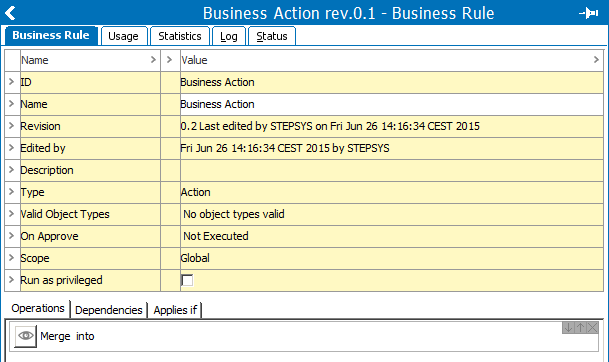
The Business Rule tab displays the following information:
- ID: Displays the business rule ID.
- Name: Displays the business rule name.
- Edited by: Displays information about which STEP user created and last edited including the date and time.
- Description: Added by the user to display information about what the business rule does.
- Type: Displays whether the business rule is a condition, an action, a library, or a function.
- Valid object types: Displays the object types valid for the business rule. When a business rule runs, it first checks if the object type is valid for the business rule. If the object type is not valid, the result of the business rule is 'not applicable.' If it is valid, the 'Applies if' operations are checked, and if not valid, the business rule is 'not applicable.' If 'Applies if' operations are valid, the business rule operations are run. For more details and examples, see the Testing a Business Rule topic here.
- On Approve: Determines if the business rule is tested or executed before or after approval. This setting is different based on the Type.
- Scope: Displays if the business rule is global or local. Global business rules are created via System Setup. Local business rules are created via a workflow and are local by default. For more information, see the Global and Local Business Rules topic here.
- Run as privileged: Business rules are generally tested and executed with the privileges of the user who triggers the test or execution. This could be a user who approves an object or imports data into STEP. As a business rule designer however, often an action should happen or a test should be performed independent of the user who triggers the condition or action. This is accomplished via the 'Run as Privileged' parameter on the Business Rule editor. When this checkbox is selected, the Action or Condition will be executed or tested with global read / write privileges.
The single Setup Action named 'Maintain business-rule' exists for maintaining business rules. This privilege can be given for specific setup groups. For more information, see the Business Rules section of the Setup Actions topic within the System Setup / Super User Guide documentation here.
- Operations Tab: Any number of rules are displayed as read-only. Actions are executed from the top-down and rollback if one fails. Conditions are tested from the top-down, and return 'true' if all are true. Condition testing stops if one is false. To review, click the View Operation
 icon.
icon. - Dependencies Tab: Dependencies to business libraries used for JavaScript conditions and action are displayed as read-only. To review, click the View Operation icon.
- Applies Tab: Preconditions for testing and/or executing the rule are displayed as read-only. If the conditions are not met, 'non-applicable' is displayed during testing / executing. To review, click the View Operation icon.
- Edit Business Rule Link: To edit the business rule, click the link. For more information, see Editing a Business Rule here.
Usage Tab
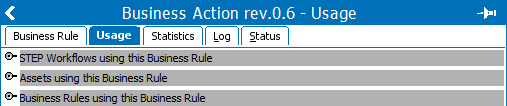
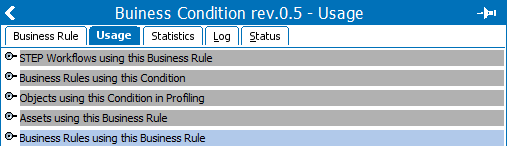
The Usage tab displays information about where the business rule is used. The available flippers are determined by the type of business rule displayed, as shown in the following images.
Statistics Tab
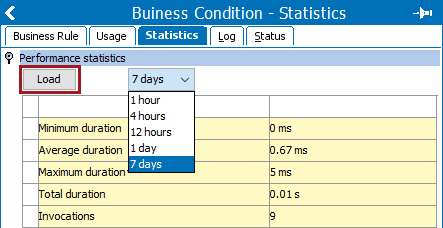
This tab shows statistics about how many times a business rule has been invoked and how it performed in the given period.
To view the statistics, select a time interval from the dropdown, and then click the Load button.
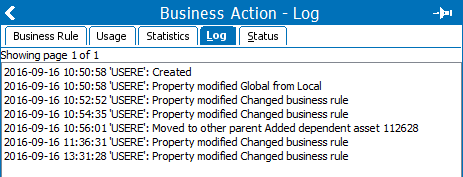
Log Tab
The Log tab shows the users and all changes that have been made.
Status Tab
The Status tab provides an overview of the revisions of the business rule, including the user who changed the object and when the change occurred. Previous versions of business rules can be viewed as read-only by clicking the eye icon for the rule.
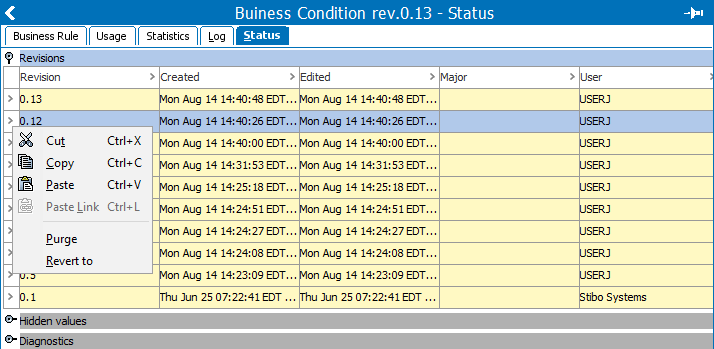
- Make Revision: Select the business rule, on the Maintain menu, click the Make Revision option.
- Revert to: Select the desired revision row, right-click the > column, and click Revert to the option from the menu to restore a previous version.
Note: When reverting to a previous version of a workflow, any local business rules owned by the workflow in question will also be reverted to the revisions that were current at the time of the workflow revision. For more information, see the Managing Workflows section of the Workflows documentation here.
- To delete a revision, select the desired row, right-click the > column, and click the Purge option from the menu.
For detail about creating revisions, see the Revisions topic within System Setup / Super User Guide documentation here.