Business Action: Trigger STEP Workflow Event
This operation can trigger the creation of a specified workflow event on a node when the business action is executed.
For example, when a user completes a task and needs to move the object from one state to another outside of the workflow, running a business rule with this action can generate the event.
For more information, see the Business Rules and Workflows topic in the Workflows documentation
This operation can also be run via a Bulk Update, as described in the Workflow: Trigger STEP Workflow Event Operation topic in the Bulk Updates documentation here.
Prerequisites
Before using this operation:
- Ensure the workflow exists including states and events.
- Ensure the node is present in the state defined in the action.
- Create a business rule as defined in the Creating a Business Rule or Library topic here.
Configuration
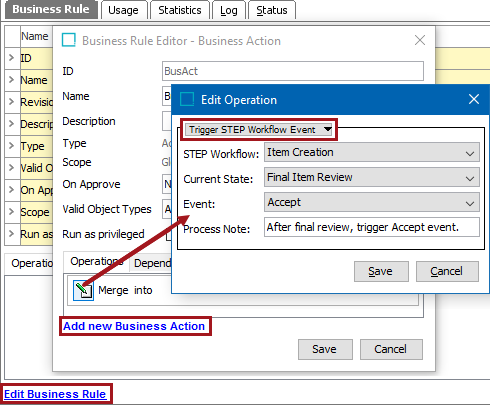
- On the Edit Operation dialog, from the dropdown select the Workflow group and then the Trigger STEP Workflow Event option.
- In the STEP Workflow parameter, from the dropdown select the relevant workflow.
- In the Current State parameter, from the dropdown select the state that the workflow object must be in when the action is applied.
- In the Event parameter, from the dropdown select the event that the action triggers.
- In the Process Note parameter, enter a comment to be written in the state log when the event is triggered.
- Click the Save button to add the operation to the business rule editor.