Business Action: Standardize Address
This operation allows for different standardization actions to be taken on addresses by using the Loqate solution. If applicable, CASS (Coding Accuracy Support System) operations can also be performed to apply a stricter level of address validation to US-based addresses.
Standardize Address business action operations are valid for execution on entities with flat attributes, e.g., Address object types and address Data Containers (Data Containers with address attributes).
An example scenario where a standardize address business action would be used is in an event processor that is configured to listen for changes in address input attributes on specified entities and/or data containers. The processor will be configured to use the 'Business Action Event Processor' processor. When the event processor is invoked, the Standardize Address business action will execute and perform an address standardization operation on the objects where the changes were detected.
This operation can also be run via a Bulk Update, as described in the Data Quality: Standardize Address Operation topic in the Bulk Updates documentation here.
Prerequisites
Before a Standardize Address operation can be used, the following conditions must be met:
- Users must be connected to a Loqate server, either through a cloud API or local API.
- The Address Component Model must already be configured. It is strongly recommended to configure this component model using the 'Easy setup of Address Component Model' wizard. For more information, see the Address Component Model section of the Loqate documentation here.
- To view and use the CASS features, users must:
- Purchase a CASS license
- Be connected to Loqate through a local API (CASS components will not work with a Loqate Cloud API)
- Be based in the US, as CASS is not valid outside of the US
- Configure the CASS Address Component Model. For more information, see the CASS Address Component Model topic in the Loqate documentation here.
- Create a business rule as defined in the Creating a Business Rule or Library topic here.
Configuration
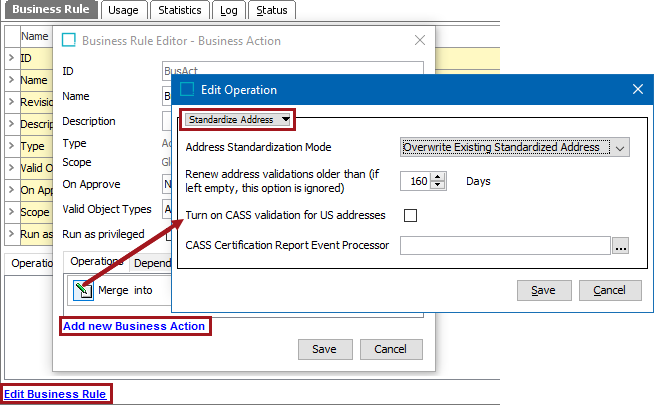
This documentation topic describes the options available when configuring a Data Quality > Standardize Address business action. For more detailed information on the overall Loqate and CASS solutions, see the Loqate Integration section of the Data Integration documentation here.
Address Standardization Modes
Three options are available from the Address Standardization Mode dropdown list.
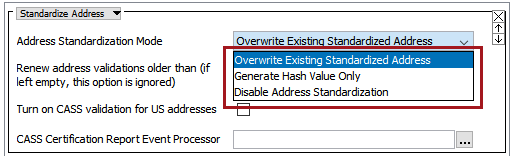
- Overwrite Existing Standardized Address: Overwrites an existing standardized address by making a call to Loqate, which returns the latest standardized address and overwrites the existing one.
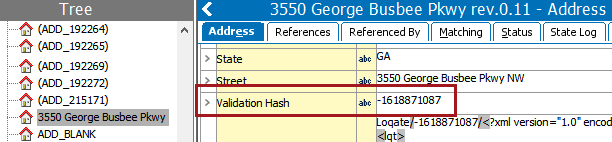
- Generate Hash Value Only: When this option is chosen, the business action will recalculate the 'Validation Hash' value without making a call to Loqate. The hash value is based on the address input fields only and is calculated and maintained by STEP.
This option is used in cases when pre-standardized addresses, which are known to be correct, are imported. Because the addresses are new, no hash value is present. When the 'Generate Hash Value only' action is run, STEP generates a hash value and places it into the 'Validation Hash' field. The hash value lets STEP know that the addresses are new, ensuring that they are not picked up and restandardized by STEP shortly after they are imported. For users of the Loqate Cloud API solution, this saves money by avoiding unnecessary calls to Loqate, since users are charged a fee for every call made to Loqate.
- Disable Address Standardization: This option is primarily useful for users who import addresses in bulk, either manually or by using an inbound integration. If a business rule is in place that runs a Standardize Address bulk update on import, then selecting 'Disable Address Standardization' is a simple way to temporarily turn off automatic address validation on import. This allows users to validate the addresses later.
Renew Address Validations
The checkbox option Renew address validations older than allows for addresses older than a designated number of days to be revalidated. This is useful in case an address was validated an extended period of time ago and the address may no longer be valid. The default number of days is 160. The field is disabled by entering the value '0.'
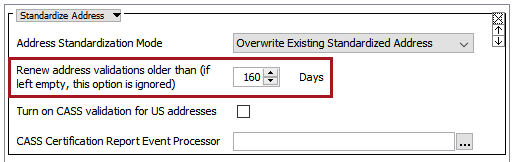
STEP determines the age of an address by the value present in the 'Validation Time' field.
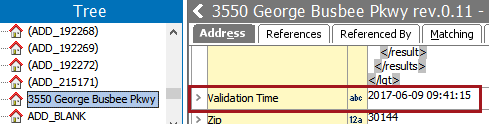
Important: For users of the Loqate Cloud installation, care should be exercised when using this functionality. Since all addresses older than the specified time period will be revalidated, each additional validation will make a chargeable call to Loqate.
Re-Validating an Address
In cases where the Standardize Address business action encounters an address that has previously been validated, the Standardize Address business action will only make an actual request to Loqate if one or more of the following occurs:
- The address has been changed since it was last validated. The system determines if the address has been validated based on the value of the Validation Hash attribute.
- The last address validation failed. The system determines if address validation failed based on the value of the Validation Integration Status attribute.
- The 'Renew Address Validations' has been configured, and the address validation is older than the time period configured. The system determines if the date has elapsed based on the value of the Validation Time attribute.
This method improves performance of the Standardize Address business action as it lessens the number of calls that are made, thus reducing costs in cases where Loqate Cloud is used. For more information on these scenarios, see the Address Component Model in the Data Integration documentation here
CASS Validation
Two CASS address validation options are available on the Standardize Address dialog.
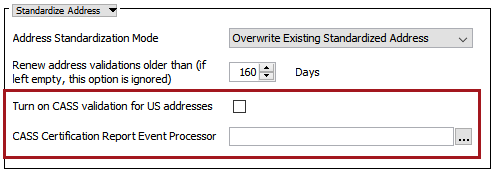
- Turn on CASS validation for US addresses: If checked, all addresses are sent for standardization to the Loqate Local server integration and also validated against CASS data.
- CASS Certification Report Event Processor: If you would also like a CASS certification report generated after using CASS validation on an address, click the ellipsis button (
 ) and select the relevant CASS certification report event processor from the 'Select Event Processor' dialog. For more information, see the CASS Certification Report Processing Plugin Parameters and Triggers section of the Event Processors documentation here.