Business Action: Execute JavaScript
In addition to the standard business rule operations, more complex functions can be carried out using JavaScript and the Scripting API. This action enables you to use the same STEP Public Java API methods that are available in the Evaluate JavaScript business condition operation.
Using JavaScript in business rules can include:
- Execute JavaScript operation is used for actions. For more information about business rule actions, see Business Actions here.
- JavaScript Binds for action and condition operations. Binds provide access to the STEP data being worked on. For more information, see JavaScript Binds in the Resource Materials online help here.
Important: Although the same JavaScript binds are available for both actions and conditions, changing STEP data via an Evaluate JavaScript business condition is not supported.
- Business Libraries is a set of JavaScript functions that can be reused in multiple business rules. For more information, see Business Libraries here.
- Scripting API documentation is available by clicking the STEP API Documentation button on the STEP Start Page.
Prerequisites
Before using this action:
- Understand the implications of using JavaScript as defined in the Java vs. JavaScript topic in the Resource Materials online help here.
- Understand the considerations that should be taken as defined in the JavaScript Considerations topic in the Resource Materials online help here.
- Create a business rule as defined in the Creating a Business Rule or Library topic here.
Configuration
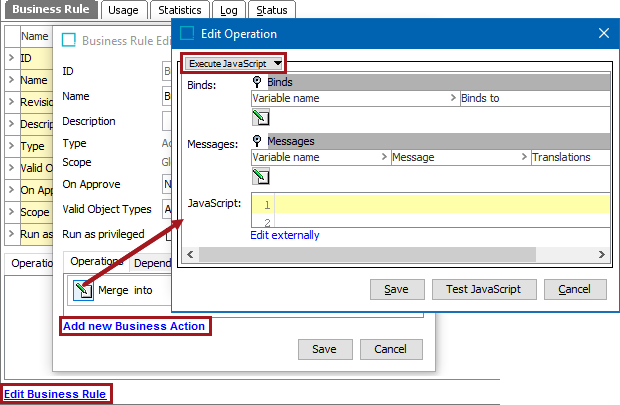
- On the Edit Operation dialog, select the Execute JavaScript option from the dropdown.
- For the Binds parameter, create binds needed for the JavaScript code as described in the Adding a Bind topic in the Resource Materials online help here.
- For the Messages parameter, create messages needed for the JavaScript code as follows:
- Click the Edit button (
 ) to display the Edit Messages dialog.
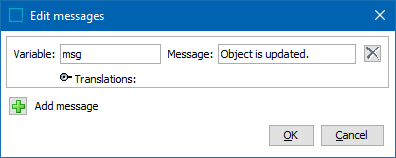
- Click the Add message button (
 ) to create a new message entry.
 - Click the Remove button (
 ) to delete a message entry.
 - For the Variables text box, type a label for the variable.
- For the Message text box, type the message.
- When necessary, open the Translations flipper and provide the data required. For more information on translatable messages, see the Adding a Localized Business Rule Message topic here.
- Click OK to save the messages to the operation.
- For the JavaScript parameter, add the JavaScript code.
- Click the Test JavaScript button to test modifications made to the JavaScript.
- Close the dialog using the appropriate method.
- Click the Save button to keep the modifications (including changes to JavaScript) and add the operation to the business rule editor.
- Click the Cancel button to roll back the modifications (including changes to JavaScript).