Configuration
The Configuration tab in the admin portal provides a view of all configuration properties on the system, including a description of each property, information on how to set it, and the current value being used. Most properties have a default value and do not need to be set unless a change to the default is required.
In a clustered environment, the relevant system can be selected from the dropdown. Clicking the Fetch data button retrieves the properties from the selected system (only one will be available in non-clustered environments so selection is not required).

Properties are grouped into categories to aid in navigation, though the simplest way to interact is generally via search (Ctrl + F). Properties that have been explicitly set are shown in bold, while those using system defaults are dimmed. A sampling of properties displaying both default and manual settings is below.
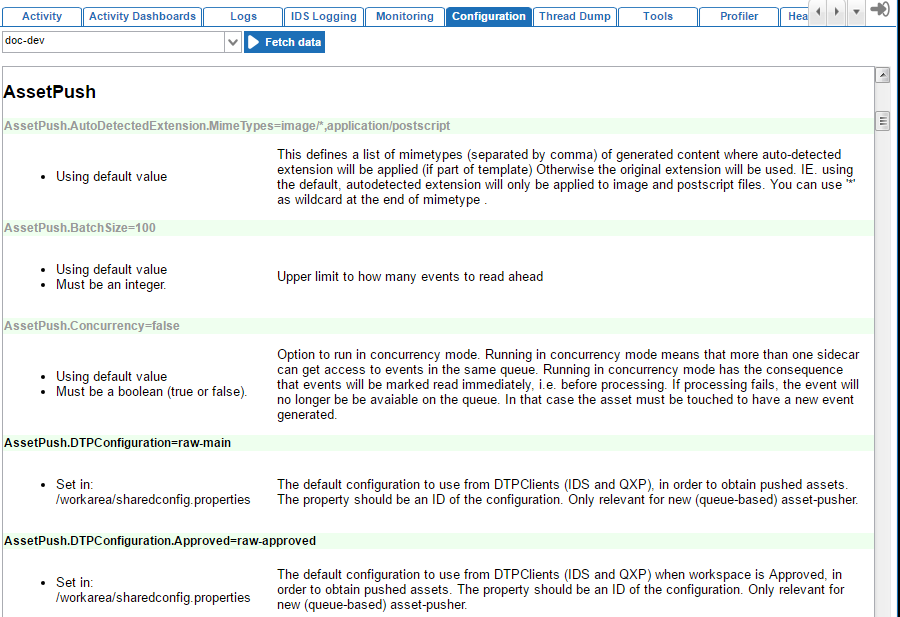
Note: Properties must be changed on the application server(s) via the relevant properties file and cannot be changed within the admin portal.
Understanding config.properties Settings
Configuration properties provide system administrators with options for controlling system behavior, logging, processing, storage of information on the application server(s), and many other things. Configuration properties are specified in the config.properties or sharedconfig.properties files on the application server(s). There is one config.properties file per application server so a clustered environment may have multiple config.properties files, with each containing settings local to a particular application server. Conversely, the sharedconfig.properties file is global so there will be only one file per setup, with all settings being applicable to all application servers. Most properties are set in the sharedconfig.properties file, with the config.properties file being used only for those properties that expressly require it.
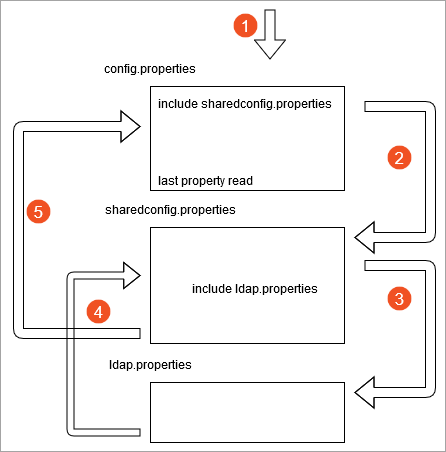
The config.properties file is read first, line-by-line, until the first 'include' statement—typically the sharedconfig.properties file as shown below.
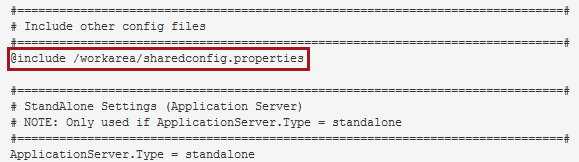
When an 'include' statement is found, the included file is read line-by-line (and any 'include' statements in those files are also read) before reading is continued in the config.properties file. A property can exist more than once in the properties files and the last value read is the only active value. This allows properties in the config.properties that come after an 'include' statement to overwrite the same properties in the sharedconfig.properties file.